
Trezor backup missing or PIN forgotten: what the official pages state
Status: Published: Official pages last read: Editorial policy
Verdict first: control over a Trezor wallet rests on two inputs, the PIN and the wallet backup. The backup, once named the recovery seed, is the record Trezor's documentation identifies as the method for restoring a wallet. Enter it only when the physical device prompts for it. If the PIN is forgotten, then the required sequence is a factory reset followed by restore from the backup. If the backup is also lost and the wallet stays inaccessible, Trezor states it cannot assist with recovery.
We operate independently of Trezor and have no affiliation with it. Its decisions are outside our control, and nothing here is an official statement by Trezor.
Need a case detail checked? Send it here:
What the platform's own pages state
- Trezor's recovery guide states that recovery uses a wallet backup, formerly called the recovery seed, to regain access to existing accounts. It warns not to input the backup anywhere unless the physical device instructs you and you confirm on the device. [1]
- The guide states that a forgotten PIN leads to a factory reset first, then wallet recovery from the backup. It adds that a reset in bootloader mode removes the firmware and all private data. [1]
- The guide states that if you find a never-used device with firmware already installed, do not proceed: unplug it and contact Customer Support to arrange a replacement. [1]
- Trezor's troubleshooting page states the wallet backup is displayed once only, that a disconnect during backup leaves an incomplete backup, and that the device must then be erased and setup restarted. [2]
- According to the official page: if the wallet still works but the backup is lost, move your funds to a wallet whose backup you control, as soon as possible. [2]
- The page states that Trezor cannot help recover a wallet when both the backup and access are gone, because it holds no control over the backup, and losing it means permanent loss of access. [2]
- Trezor's PIN page states that the PIN stops anyone who gets physical possession of the device from using it, and that 10 wrong attempts on the Safe 7, or 16 on the Safe 5, Safe 3, Model T and Model One, trigger a reset that erases the wallet. [3]
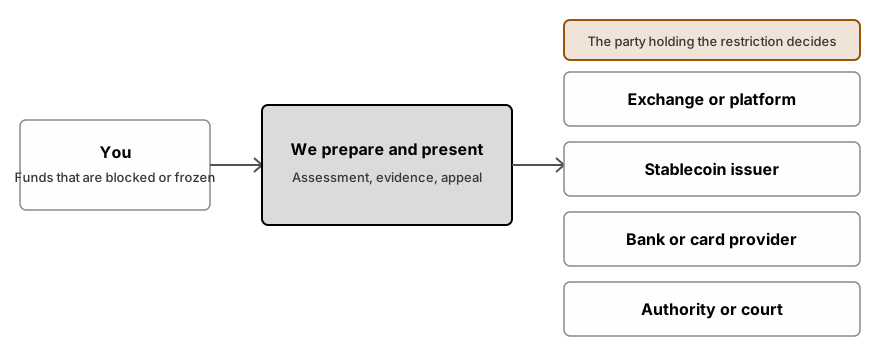
Typical restrictions
| Restriction type | Meaning |
|---|---|
| Lost PIN | The guide from Trezor describes a factory reset, then recovery from the wallet backup. This reset wipes the private data stored on the device, so the backup is the only input that restores access. |
| Backup missing or incomplete | The device displays the backup one time only. If it disconnects during backup, the backup cannot be shown again; Trezor instructs you to erase the device and restart setup. That step is simple only while no funds are loaded. |
| Wallet backup missing | If the wallet still works, Trezor says to move the funds to a wallet with a known backup, without delay. If access is gone, the page states that Trezor cannot recover it. |
| Device with possible prior use | Check the firmware state first. Trezor instructs that if a new device already ships with firmware installed, you should stop the setup, unplug the device, and contact customer support about a replacement. |
What you can do, step by step
- Check if the wallet is still openable
If the PIN still unlocks the wallet on the device, then the urgency applies to the missing backup, not to the funds. Do not wipe the device at this stage.
- Move funds when the wallet opens but backup is gone
Trezor's instruction: transfer funds to a wallet whose backup you control, promptly. Set up a new wallet with a fresh backup, then move the funds with care.
- Locate the wallet backup
Find the offline written record of your recovery seed. This record is the input needed to restore the wallet after the device is lost, wiped or damaged.
- Reset and recover on the device only
If the PIN is forgotten, then Trezor's procedure is a factory reset followed by recovery from the backup. Enter the words only at the device's prompt, and confirm each step on the device itself.
- Never enter the backup on any website or message
Trezor sets the trigger for backup entry on the device itself. No other source may request it. If a message asks for the backup, treat that as a hostile input and discard it, regardless of the claimed sender.
- Contact Trezor support via its official site for hardware faults
Hardware faults follow a fixed path: Trezor directs users with a suspect or faulty device to its own customer support. Start from its official pages only. Its stated constraint remains in force: a lost backup cannot be recovered, and Trezor says so itself.
Inputs to prepare
- The device model and the date you configured it
- The written wallet backup, kept offline and typed only on the device
- The addresses and balances you can verify on a block explorer
- Photographs or captures of every error screen and on-screen setup prompt you encountered
- A written note of where and how the backup and the PIN were stored
- If the device was stolen, the report number filed with police
Pitfalls and scams to avoid
- Share no wallet backup, seed, private key, PIN or password with anyone, including anyone claiming to be Trezor support or a recovery service.
- Trezor states that backup entry belongs on the physical device alone. If a website or chat requests it, the outcome is a scam.
- Treat unsolicited recovery offers as a trigger for loss. Trezor states it holds no control over your backup and cannot restore it.
- Reject any device that arrives pre-configured. Trezor instructs users to stop and contact support in that case.
When outside help makes sense
- You lost the backup, the wallet no longer opens, and you want to check what options remain
- A damaged device calls for a vetted specialist, not an advertisement
- If backup information was input to a deceptive website, funds were extracted; we then coordinate the organization of the resulting evidence.
- You are handling the wallet of a person who has died or cannot act.
Questions people ask
What can I do if I forgot my Trezor PIN?
The recovery guide from Trezor specifies this sequence: first perform a factory reset, then restore the wallet from the wallet backup. A reset done in bootloader mode erases the firmware and all private information. Input requirement: the backup must exist before you start. Without it, the reset is irreversible.
Can Trezor restore a wallet backup I have lost?
No. Per Trezor's troubleshooting page, a lost backup combined with no wallet access means it cannot assist with recovery. The mechanism: Trezor holds no control over the backup. Consequence: losing it permanently ends access.
What options exist if the backup is lost but the wallet still opens?
Trezor instructs users to transfer funds to a wallet backed up with a known recovery phrase as soon as possible. Do not wipe the device before the transfer. Follow Trezor's own procedure for setting up a new wallet and moving the funds.
What happens after wrong PIN attempts?
Per Trezor's PIN documentation, the Safe 7 wipes itself after 10 failed attempts; the Safe 5, Safe 3, Model T and Model One wipe after 16. Either way the device is erased, and the backup is the only remaining input for restoring access.
If the backup material is input into a website, is the security protocol of that platform verified before initiating the recovery sequence?
No. Control check: only the physical device should request the backup. Trezor says not to enter the wallet backup anywhere unless the device itself instructs it, and to confirm the request on the device. Any site or message asking for the backup is a common scam pattern. If such a prompt appears, stop; do not input the backup.
What should I do if the Trezor I just bought already runs firmware?
Trezor's instructions give three steps: stop, do not continue setup, disconnect the device. Contact customer support and request a replacement. A never-used device showing signs of use is treated as a warning sign.
Is this page from Trezor?
No. This service has no affiliation with Trezor and operates independently of it. We compile and summarize Trezor's published pages, provide links to those pages, and have no input into any decision the company makes about your device or account.
Related services
- Hardware wallet recovery assistance. Lost PIN, damaged or missing hardware wallet: honest options plus vetted independent labs.
- Recovering wallet passwords and damaged files. Lost password or damaged wallet file: screened independent specialists attempt recovery.
- Crypto access after death or lost control. Lawful access to crypto of a deceased or incapacitated person, via lawyers and specialists.
Read next
Official pages read
This record is derived from external, primary sources. Validation depends on the source documentation. Changes occur; review the originating platform for current content.
The content on this page is general. It is not legal advice.