How to find an old Bitcoin wallet: search steps, safe handling, and when to get help
Status: Published: Last reviewed: Editorial policy
Locating an old Bitcoin wallet means checking three places: wallet files (a wallet.dat file is the software wallet's data record), devices and backups that may contain those files, and written recovery words or old exchange emails. Search on copies only. Keep the computer offline during the search, and verify balances using public addresses alone. If a drive shows damage or a file stays locked, stop and hand it to a specialist before attempting repairs yourself.
Need a case detail checked? Send it here:
Define the target first
Bitcoin reserves do not diminish over time. Accumulated currency remains indexed on the blockchain at its associated addresses. The objective is the control secret. This secret resides within wallet files, devices, physical sheets, recovery word lists, or behind exchange authentication.
Determine the acquisition vector. Specify purchase year, location of purchase, and storage methodology. Exchange transactions indicate account status. Desktop software usage implies local file residency. Hardware device use points to recovery word documentation. Input this data to compile clues.
- Electronic correspondence from exchanges or wallet platforms, specifically noting registration, transaction confirmations, and withdrawal attempts.
- Financial records, card data, or payment manifests documenting BTC acquisition.
- Handwritten notes in old notebooks, printed pages, and photographs of written-down phrases.
- Check password manager records, stored browser logins, and past chat threads with friends or family.
- An inventory of each computer, phone, tablet and drive that was in use during those years.
Typical wallet categories, and where each leaves a record
Folder and file names vary across programs, versions and operating systems. Search by keywords and file names, not folders alone. The table shows typical patterns; it is not exhaustive. Treat a name as weak evidence: wallet.dat is also used by other coins, and the file may contain nothing.
| Wallet type | What to look for | Where it often sits |
|---|---|---|
| Bitcoin Core and the older Bitcoin-Qt | A file called wallet.dat, or a wallets directory containing that file | The program's data directory inside the user profile; many systems hide it by default |
| Electrum | Wallet files with no visible extension, frequently stored in a wallets folder | A directory called Electrum or .electrum inside the user profile |
| MultiBit | Files with a .wallet or .key extension, together with any backups of them | A MultiBit folder in the user profile, or a backup copy of that folder |
| Web wallet account | The account password, together with a wallet ID located in an old email message | Email inbox, password vault or stored browser credentials |
| Mobile wallet app | The app itself, or a recovery phrase stored in its settings | Old phones and tablets, plus cloud or computer backups of them. |
| Hardware wallet | A compact device, frequently supplied with a card or paper listing recovery words | Check drawers, safes and deposit boxes; store the written backup separately. |
| Paper wallet | A printed sheet bearing QR codes or long strings of characters. | Folders, safes, deposit boxes, or a stored PDF and old printout. |
| Account on an exchange | Order confirmations, account statements, and withdrawal notification emails | Mailbox records plus bank or card statements showing the buy |
Search locations on drives and backups
A wallet file can sit in a folder you have not opened for years. Check the obvious locations first, then extend the search to every backup copy you ever created.
Search the system for filenames like wallet.dat and for terms such as bitcoin and electrum, with hidden files visible. Work on a duplicated drive, never on the original.
- Investigate stored hardware assets, specifically old computers, laptops, or tablets, found within residential storage or relative properties.
- External drives, USB sticks, memory cards and storage on the network.
- Check stored system backups: phone backups, Mac backup drives, or Windows backup sets contain wallet data.
- Cloud storage and sync folders, plus email attachments you once mailed to yourself for safekeeping.
- Check hidden application-data folders inside the user profile: wallet software often stored its files there.
- Paper records tucked into safes, deposit boxes, books or archived folders.
Found a wallet? Copy it first, keep it offline
Protect the original before anything else. Copy every drive or file first, leave the original untouched in secure storage, and open only the copy.
Keep the work offline. Unplug the machine from the network before you examine the copy. Old drives may hold malware, and wallet software can begin syncing or transmitting data without warning. Never install recovery tools found via search results or ads.
Was a file deleted? Then stop all use of that drive immediately. Further writes can overwrite the data you need. Do not run repair or undelete software on the original. An exact drive image, made by a specialist first, is the safe path.
- Never upload a wallet file, phrase or key to any website, balance checkers included.
- Never paste recovery words or keys into a search box or chat, even when asking for help.
- Maintain a simple record: what was found, where, when, and the action taken.
- Label every copy clearly, and store one spare copy on a separate device.
Check funds without exposing any secret
Addresses are public records. If you recover a list of addresses, look each one up on a block explorer: the balance and transaction history are visible. Coins sitting at an address prove the coins exist. They prove nothing about whether you still control the keys. Run the lookup on a device other than the old computer, and transfer only the addresses across.
Do not enter a recovery phrase or a private key into any explorer or balance tool. If written recovery words turn up, restore them only in a current wallet program downloaded from the maker's official site, on a clean device. Then compare the first address the program shows against an address you know.
After the balance check confirms funds, move them to a new wallet that you create yourself, with a fresh backup. Coins sent to an exchange can trigger questions about their origin, so collect your old purchase records before you move anything.
When access fails: a locked, damaged or lost wallet
A wallet file may demand a password you no longer recall. A drive may fail to start. A file may be corrupt. These are technical cases, and every wrong attempt reduces the chance of recovery. Pause before attempting repairs on your own. If any sign below appears, stop and engage a specialist.
- A drive that fails to power on, makes unusual noises or reports errors.
- A wallet file locked behind a forgotten password, where you remember parts of it.
- Retrieval applies to data in deleted files, or storage devices that have been wiped or reformatted.
- A file or a storage device whose format you cannot identify.
- A large amount of funds, or an old machine that doubles as evidence in a dispute or an estate.
When to hire a specialist, and whom not to engage
Independent specialists can create an image of a damaged drive, retrieve deleted files and test probable passwords against a copy of a wallet file. A sound engagement has a written scope, operates on copies, leaves the funds under your control and never requests your seed phrase. Fees are often linked to success, but terms differ, so read them first.
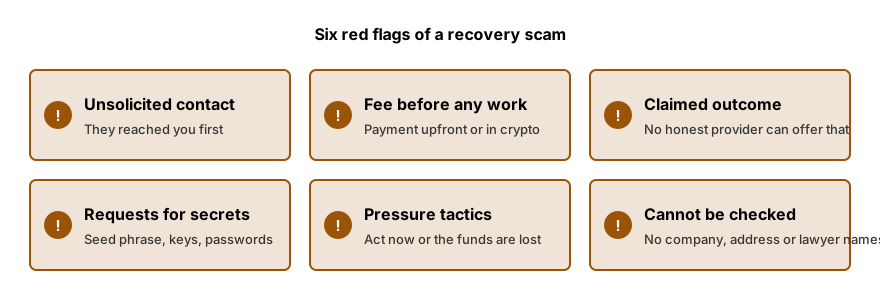
Screen out anyone who contacts you first, requests payment before reviewing the case, asks for remote access, or states an outcome as certain. If a person claims they can see your lost Bitcoin and only require a fee to unlock it, that claim is the trigger: it is a scam, not a recovery.
We structure existing crypto assets and document the feasibility of recovery via independent specialists. Initial assessments carry zero cost. Fee negotiation occurs only after viability is confirmed. The service does not guarantee wallet location or operational status. We strictly prohibit requesting seed phrase, private keys, or passwords.
Frequently asked questions
Does Bitcoin from years ago still exist on the network?
Bitcoin balances do not expire. As long as the network operates, the coins remain recorded at their addresses. What you can lose is control: if the wallet file, the hardware or the written recovery words are gone, your access disappears with them. The working question is therefore whether the secret that controls the coins can still be located.
How can I look up the balance of an old address?
Enter the public address into a block explorer. Addresses are public data, so pasting one carries no risk. Any balance checker that requests a seed phrase or a private key should be refused; the check never needs them. Note the constraint: a displayed balance proves the coins exist in that address, not that you retain the ability to spend them.
Does a file called wallet.dat always hold Bitcoin?
Not on its own. Several other coins use that same file name, and the wallet behind it may be empty or may hold only leftover change. Treat the file as a lead, not a verdict. Keep an untouched copy, then have someone with experience examine the copy before you conclude anything.
Does installing the legacy wallet program and attempting to open the file constitute an acceptable step?
Locating an old Bitcoin wallet is possible. The operation requires a copy of the file, offline execution, and software downloaded only from the manufacturer's official website. Certain wallet programs modify the wallet file upon opening it. Therefore, store the unmodified original in a secure location.
Does the operational scope necessitate taking the legacy computer to a specialized recovery facility?
State your conditions first, before you hand anything over. Require a written scope of work, require that they copy the drive and work on the image only, and never give anyone your password or seed phrase. If a shop refuses these terms, that refusal is your signal: it does not understand wallet data.
How we can help
- Recovering wallet passwords and damaged files. Lost password or damaged wallet file: screened independent specialists attempt recovery.
- Hardware wallet recovery assistance. Lost PIN, damaged or missing hardware wallet: honest options plus vetted independent labs.
- Crypto access after death or lost control. Lawful access to crypto of a deceased or incapacitated person, via lawyers and specialists.
- Sourcing of funds and wealth: document packs. Build a clear source of funds and source of wealth pack for exchanges, banks and processors.
The content on this page is general. It is not legal advice.